Cross of HOTS by Tinier17 Mouse Cursor
view on Steam Workshop
About
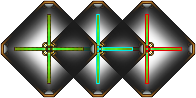
A stylized, symmetrical cross design featuring three interconnected diamond-shaped segments. Each segment contains a glowing cross with distinct colors: green on the left, cyan in the center, and red on the right. The design has a dark, metallic aesthetic with glowing edges and central hubs. Created by Tinier17 (Bilibili uid2907834). Use YoloMouse to apply it to your game or desktop.
© Tinier17作品
(Bilibili:uid2907834)
授权协议:
个人使用与二次编辑: 本作品允许 个人用户 进行下载、复制、修改以及二次创作。二次编辑后的新作品仅可用于个人学习、交流或个人非商业用途。
禁止行为: 严禁 将本作品(包括原始版本及任何二次编辑后的修改版本)用于任何形式的商业用途。未经原作者明确书面许可,不得将本作品或衍生作品用于销售、租赁、广告、推广、商业展览、商业印刷或任何以营利为目的的活动。
保留署名: 若在公开(非商用)平台发布二次编辑作品,建议(或要求)注明原作者信息及原始出处。
声明: 如需获取商业授权,请通过 [Tinier17@Gmail.com] 联系作者洽谈。
© Tinier17
(Bilibili:uid2907834)
License Terms:
Personal Use & Secondary Editing: This work is hereby granted for personal, non-commercial use. Individuals are permitted to download, copy, modify, and create derivative works based on this material. Any new works created through secondary editing are strictly limited to personal learning, private study, or personal non-commercial display.
Prohibited Actions: Commercial use of this work (including both the original and any modified/derivative versions) is strictly prohibited. Without the explicit written permission of the original author, this work or its derivatives may not be used for sale, rental, advertising, promotion, commercial exhibitions, commercial printing, or any other profit-oriented activities.
Attribution: When publishing a modified version publicly (for non-commercial purposes only), it is recommended (or required) to credit the original author and provide a link to the original source.
Notice: For commercial licensing inquiries, please contact the author at [Tinier17@Gmail.com].
© 2026/03 Tinier17. All rights reserved (except as explicitly granted).
Instructions
- Install and run YoloMouse.
- Enter Manual tab.
- Find this bundle in the Discover button.
- Assign to your favorite game or app.
Details
- Current subscribers
- 60
- Published
- 2026-03-13
- Updated
- 2026-03-13
Basic Other Bundle Dark Red Yellow green
 Pixel Mouse Icons Set
 Lava Puzzle Arrow
 Old School RuneScape Dragon Dagger
 Druid's Verdant Arrow